RTO Vehicle Information — Check Vehicle, Licence & Owner Details Online
The Indian Regional Transport Office is the main authoritative firm responsible for any type of record maintaining of Indian resgitered vehicles, like issuing driving licenses,to enforce road transport regulation and many all type of vehicle paperwork across the country. Like RTO vehicle information is useful for verify who is the car owner is it first or 2nd any legal problem like echallans etc.
In this article we will explain you everything related to RTO, and what kind of data is stored in RTO website and how you can view all the information using official websites and mobile apps.
What Is RTO Vehicle Information?
RTO vehicle information refers to all the details recorded by the Regional Transport Office when a vehicle is registered and during its lifecycle on Indian roads. This information is stored in national transport databases such as VAHAN and is accessible online through official government tools.
Typical kinds of information maintained by the RTO include:
- Vehicle Registration Details: Details of vehicle using car number you can get car owner name, date registered, vehicle expiry date using RC.
- Owner Information: All the details of Vehicle registered owner like first name and last name, state, city.
- Vehicle Specifications: all the details of Vehicle like engine and chassis number
- Insurance Records: Insurance policy status and validity.
- Fitness Certificate Validity: all the details till when fitness certificate is valid on.
- Tax & Fee Records: Road tax payment history and status.
- Hypothecation (Loan) Details: Information about weather is vehicle is Hypo or not (make it has loans or not)
- Vehicle History: Details of past owners, transfers of ownership, and any recorded penalties or violations.
Why Do You Need RTO Vehicle Information?
Getting access to RTO vehicle information online can be useful in many situations:
Buying a Used Vehicle: When you buy a used vehicle it is helpful source to verify previous owner details.
Insurance Claims: You can get the insurance history weather the previous buyer have taken or not.
Accident or Legal Cases: Use official details to support investigations or documentation.
Own Vehicle Monitoring: You can also monitor your vehicle before and after transfer.
Ownership Transfer: You can confirm all the details in RTO websites when transfer your vehicle to someone else.
How to Check RTO Vehicle Information Online
The Indian Transport authority have made it easy for it users to access the RTO vehicle information online via 2 main sources which is VAHAN portal and mParivahan mobile app and both are managed by the Ministry of Road Transport and Highways (MoRTH).
- On the VAHAN Portal (Official Website)
The VAHAN portal is a web based portal that will check all the details related to RTO without visiting the regional RTO office nearby and here is how to use it:-
- Visit the Official Parivahan Website — Open the Parivahan Sewa portal via visiting parivahan.gov.in.
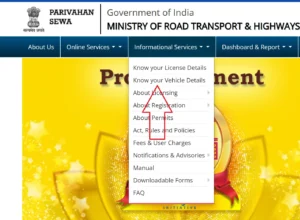
- Find “Know Your Vehicle Details” — Under “Informational Services,” choose this option to start a vehicle search.
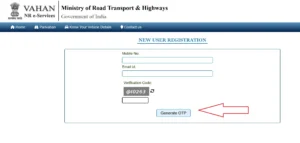
- Create or Login to Your Account — Some services may require you to register or log in using a mobile number and OTP for secure access.
- Enter Vehicle Registration Number — Type the exact number and complete the captcha verification.
- Submit and View Results — Click “Search” You’ll see vehicle details such as ownership status, insurance validity, fitness certificate status, and more.
Note: The VAHAN portal returns data directly from the national transport database, making it one of the most reliable ways to check RTO vehicle information.
- On the mParivahan Mobile App
If you want to view vehicle information on the go, the mParivahan app is the official government app that works similarly:
- Install the App: Download mParivahan from Google Play (Android) or Apple App Store (iOS).
- Register or Login: Use your mobile number and verify via OTP.
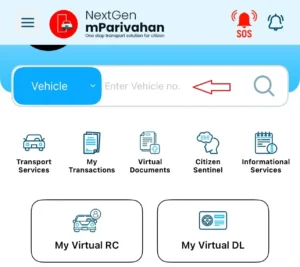
- Navigate to Vehicle Search: Tap on options like “RC Search” or “Vehicle Details.”
- Enter Vehicle Registration Number: Type in the full registration number.
- View Information: The app displays vehicle specs, masked owner details, RC and insurance validity, and other key data.
Using the mParivahan app is particularly convenient during roadside checks or when you need to verify details while away from your computer.
How to Check Driving Licence Details Online
In addition to vehicle information, you can also view your driving licence records online using Parivahan services:
Via the Sarathi Portal:
- Visit sarathi.parivahan.gov.in — the official portal for licence services.
- Select your state where your licence is issued.
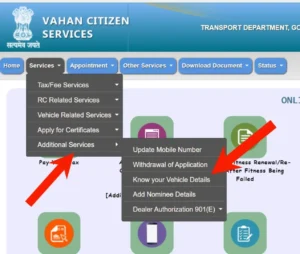
- Click on “Know Your Licence Details” under the licence services section.
- Fill in your Licence Number and Date of Birth, then enter the captcha code.
- Submit to view details like your name, licence validity, categories of vehicles you are permitted to drive, issue date, and any endorsements or penalties.
Via the mParivahan App:
You can also view your driver licence information securely on the mobile app by choosing the relevant licence lookup section after logging in.
What the RTO Vehicle Record Tells You
When you search for RTO vehicle information, you may see details such as:
- Vehicle’s registration number and expiry
- Date of registration and issuing RTO code
- Make, model, and fuel type
- Insurance validity and history
- Fitness certificate status (for commercial vehicles)
- Hypothecation or loan information
- Road tax payment status
- Owner information (partially masked for privacy)
This information helps you to understand that your vehicle is legally valid or not, its history and weather it is up to date or not.
Important Tips for Online RTO Checks
Avoid the use of 3rd party website to check RC related for any information related to your vehicle and only go through Parivahan Sewa and mParivahan and for the process you can get all the details regarding to it here.
Frequently Asked Questions (FAQs)
Q1. What is RTO and its main role?
The Regional Transport Office (RTO) is the government authority in India responsible for registering vehicles, issuing driving licences, enforcing motor vehicle rules, and maintaining transport records.
Q2. How can I check a vehicle’s owner details using the registration number?
You can use the VAHAN portal or mParivahan app and enter the vehicle’s registration number. The system will display key details such as make, model, insurance expiry, fitness status, and partial owner information.
Q3. Is the information online authoritative?
Yes information accessed through official government platforms (Parivahan Sewa and mParivahan) comes directly from the national transport database maintained by MoRTH.
Q4. Can I use this data for buying a second-hand vehicle?
Absolutely. Checking the vehicle’s registration, insurance, and hypothecation records helps you avoid fraud and confirms that transfer and ownership details are correct.
Q5. Do I need to visit the RTO office physically to check details?
No most vehicle and licence information can now be checked online through the official portals and apps without visiting the RTO